Collections classes are heart of java API though I feel using them judiuously is an art.its my personal experience where I have improved performance by using ArrayList where legacy codes are unnecesarily used Vector etc.
JDK 1.5 introduce some good concurrent collections which is highly efficient for high volume , low latency system.
The synchronized collections classes, Hashtable and Vector, and the synchronized wrapper classes, Collections.synchronizedMap and Collections.synchronizedList, provide a basic conditionally thread-safe implementation of Map and List.
However, several factors make them unsuitable for use in highly concurrent applications -- their single collection-wide lock is an impediment to scalability and it often becomes necessary to lock a collection for a considerable time during iteration to prevent ConcurrentModificationExceptions.
The ConcurrentHashMap and CopyOnWriteArrayList implementations provide much higher concurrency while preserving thread safety, with some minor compromises in their promises to callers. ConcurrentHashMap and CopyOnWriteArrayList are not necessarily useful everywhere you might use HashMap or ArrayList, but are designed to optimize specific common situations. Many concurrent applications will benefit from their use.
So what is the difference between hashtable and ConcurrentHashMap , both can be used in multithreaded environment but once the size of hashtable becomes considerable large performance degrade because for iteration it has to be locked for longer duration.
Since ConcurrentHashMap indroduced concept of segmentation , how large it becomes only certain part of it get locked to provide thread safety so many other readers can still access map without waiting for iteration to complete.
In Summary ConcurrentHashMap only locked certain portion of Map while Hashtable lock full map while doing iteration.
As always comments , suggestions are welcome.
Showing posts with label javaSpecial. Show all posts
Showing posts with label javaSpecial. Show all posts
Monday, February 7, 2011

How HashMap works in Java
How HashMap works in Java
How HashMap works in Java or sometime how get method work in HashMap is common interview questions now days. Almost everybody who worked in Java knows what hashMap is, where to use hashMap or difference between hashtable and HashMap then why this interview question becomes so special? Because of the breadth and depth this question offers. It has become very popular java interview question in almost any senior or mid-senior level java interviews.
Questions start with simple statement
"Have you used HashMap before" or "What is HashMap? Why do we use it “
Almost everybody answers this with yes and then interviewee keep talking about common facts about hashMap like hashMap accpt null while hashtable doesn't, HashMap is not synchronized, hashMap is fast and so on along with basics like its stores key and value pairs etc.
This shows that person has used hashMap and quite familier with the funtionalities HashMap offers but interview takes a sharp turn from here and next set of follow up questions gets more detailed about fundamentals involved in hashmap. Interview here you and come back with questions like
"Do you Know how hashMap works in Java” or
"How does get () method of HashMap works in Java"
And then you get answers like I don't bother its standard Java API, you better look code on java; I can find it out in Google at any time etc.
But some interviewee definitely answer this and will say "HashMap works on principle of hashing, we have put () and get () method for storing and retrieving data from hashMap. When we pass an object to put () method to store it on hashMap, hashMap implementation calls
hashcode() method hashMap key object and by applying that hashcode on its own hashing funtion it identifies a bucket location for storing value object , important part here is HashMap stores both key+value in bucket which is essential to understand the retrieving logic. if people fails to recognize this and say it only stores Value in the bucket they will fail to explain the retrieving logic of any object stored in HashMap . This answer is very much acceptable and does make sense that interviewee has fair bit of knowledge how hashing works and how HashMap works in Java.
But this is just start of story and going forward when depth increases a little bit and when you put intervieww on scenarios every java developers faced day by day basis. So next question would be more likely about collision detection and collision resolution in HashMap e.g
"What will happen if two different objects have same hashcode?”
Now from here confusion starts some time interviewer will say that since Hashcode is equal objects are equal and HashMap will throw exception or not store it again etc. then you might want to remind them aobut equals and hashCode() contract that two unequal object in Java very much can have equal hashcode. Some will give up at this point and some will move ahead and say "Since hashcode () is same, bucket location would be same and collision occurs in hashMap, Since HashMap use a linked list to store in bucket, value object will be stored in next node of linked list." great this answer make sense to me though there could be some other collision resolution methods available this is simplest and HashMap does follow this.
But story does not end here and final questions interviewer ask like
"How will you retreive if two different objects have same hashcode?”
Hmmmmmmmmmmmmm
Interviewee will say we will call get() method and then HashMap uses keys hashcode to find out bucket location and retreives object but then you need to remind him that there are two objects are stored in same bucket , so they will say about traversal in linked list until we find the value object , then you ask how do you identify vlaue object because you don't value object to compare ,So until they know that HashMap stores both Key and Value in linked list node they won't be able to resolve this issue and will try and fail.
But those bunch of people who remember this key information will say that after finding bucket location , we will call keys.equals() method to identify correct node in linked list and return associated value object for that key in HashMap. Perfect this is the correct answer.
In many cases interviewee fails at this stage because they get confused between hashcode () and equals () and keys and values object in hashMap which is pretty obvious because they are dealing with the hashcode () in all previous questions and equals () come in picture only in case of retrieving value object from HashMap.
Some good developer point out here aht using immutable, final object with proper equals () and hashcode () implementation would act as perfect HashMap keys and improve perforance of hashMap by reducing collision. Immutablity also allows cacching there hashcode of different keys which makes overall retreival process very fast and suggest that String and various wrapper classes e.g Integer provided by Java Collection API are very good HashMap keys.
I like this question because of its depth and number of concept it touches indirectly, if you look at questions asked during interview this HashMap questions has verified
Concept of hashing
Collision resolution in HashMap
Use of equals () and hashCode () method and there importance?
Benefit of immutable object?
Just to summararize here are the answers which does makes sense for above questions
How HashMAp works in Java
HashMap works on principle of hashing, we have put () and get () method for storing and retrieving object form hashMap.When we pass an both key and value to put() method to store on HashMap, it uses key object hashcode() method to calculate hashcode and they by applying hashing on that hashcode it identifies bucket location for storing value object.
While retrieving it uses key object equals method to find out correct key value pair and return value object associated with that key. HashMap uses linked list in case of collision and object will be stored in next node of linked list.
Also hashMap stores both key+value tuple in every node of linked list.
What will happen if two different HashMap key objects have same hashcode?
They will be stored in same bucket but no next node of linked list. And keys equals () method will be used to identify correct key value pair in HashMap.
In terms of usage HashMap is very versatile and I have mostly used hashMap as cache in electronic trading application I have worked . Since finance domain used Java heavily and due to performance reason we need caching a lot HashMap comes as very handy there.
to check some article on hashMap see here
How HashMap works in Java or sometime how get method work in HashMap is common interview questions now days. Almost everybody who worked in Java knows what hashMap is, where to use hashMap or difference between hashtable and HashMap then why this interview question becomes so special? Because of the breadth and depth this question offers. It has become very popular java interview question in almost any senior or mid-senior level java interviews.
Questions start with simple statement
"Have you used HashMap before" or "What is HashMap? Why do we use it “
Almost everybody answers this with yes and then interviewee keep talking about common facts about hashMap like hashMap accpt null while hashtable doesn't, HashMap is not synchronized, hashMap is fast and so on along with basics like its stores key and value pairs etc.
This shows that person has used hashMap and quite familier with the funtionalities HashMap offers but interview takes a sharp turn from here and next set of follow up questions gets more detailed about fundamentals involved in hashmap. Interview here you and come back with questions like
"Do you Know how hashMap works in Java” or
"How does get () method of HashMap works in Java"
And then you get answers like I don't bother its standard Java API, you better look code on java; I can find it out in Google at any time etc.
But some interviewee definitely answer this and will say "HashMap works on principle of hashing, we have put () and get () method for storing and retrieving data from hashMap. When we pass an object to put () method to store it on hashMap, hashMap implementation calls
hashcode() method hashMap key object and by applying that hashcode on its own hashing funtion it identifies a bucket location for storing value object , important part here is HashMap stores both key+value in bucket which is essential to understand the retrieving logic. if people fails to recognize this and say it only stores Value in the bucket they will fail to explain the retrieving logic of any object stored in HashMap . This answer is very much acceptable and does make sense that interviewee has fair bit of knowledge how hashing works and how HashMap works in Java.
But this is just start of story and going forward when depth increases a little bit and when you put intervieww on scenarios every java developers faced day by day basis. So next question would be more likely about collision detection and collision resolution in HashMap e.g
"What will happen if two different objects have same hashcode?”
Now from here confusion starts some time interviewer will say that since Hashcode is equal objects are equal and HashMap will throw exception or not store it again etc. then you might want to remind them aobut equals and hashCode() contract that two unequal object in Java very much can have equal hashcode. Some will give up at this point and some will move ahead and say "Since hashcode () is same, bucket location would be same and collision occurs in hashMap, Since HashMap use a linked list to store in bucket, value object will be stored in next node of linked list." great this answer make sense to me though there could be some other collision resolution methods available this is simplest and HashMap does follow this.
But story does not end here and final questions interviewer ask like
"How will you retreive if two different objects have same hashcode?”
Hmmmmmmmmmmmmm
Interviewee will say we will call get() method and then HashMap uses keys hashcode to find out bucket location and retreives object but then you need to remind him that there are two objects are stored in same bucket , so they will say about traversal in linked list until we find the value object , then you ask how do you identify vlaue object because you don't value object to compare ,So until they know that HashMap stores both Key and Value in linked list node they won't be able to resolve this issue and will try and fail.
But those bunch of people who remember this key information will say that after finding bucket location , we will call keys.equals() method to identify correct node in linked list and return associated value object for that key in HashMap. Perfect this is the correct answer.
In many cases interviewee fails at this stage because they get confused between hashcode () and equals () and keys and values object in hashMap which is pretty obvious because they are dealing with the hashcode () in all previous questions and equals () come in picture only in case of retrieving value object from HashMap.
Some good developer point out here aht using immutable, final object with proper equals () and hashcode () implementation would act as perfect HashMap keys and improve perforance of hashMap by reducing collision. Immutablity also allows cacching there hashcode of different keys which makes overall retreival process very fast and suggest that String and various wrapper classes e.g Integer provided by Java Collection API are very good HashMap keys.
I like this question because of its depth and number of concept it touches indirectly, if you look at questions asked during interview this HashMap questions has verified
Concept of hashing
Collision resolution in HashMap
Use of equals () and hashCode () method and there importance?
Benefit of immutable object?
Just to summararize here are the answers which does makes sense for above questions
How HashMAp works in Java
HashMap works on principle of hashing, we have put () and get () method for storing and retrieving object form hashMap.When we pass an both key and value to put() method to store on HashMap, it uses key object hashcode() method to calculate hashcode and they by applying hashing on that hashcode it identifies bucket location for storing value object.
While retrieving it uses key object equals method to find out correct key value pair and return value object associated with that key. HashMap uses linked list in case of collision and object will be stored in next node of linked list.
Also hashMap stores both key+value tuple in every node of linked list.
What will happen if two different HashMap key objects have same hashcode?
They will be stored in same bucket but no next node of linked list. And keys equals () method will be used to identify correct key value pair in HashMap.
In terms of usage HashMap is very versatile and I have mostly used hashMap as cache in electronic trading application I have worked . Since finance domain used Java heavily and due to performance reason we need caching a lot HashMap comes as very handy there.
to check some article on hashMap see here
Friday, September 24, 2010
The Java serialization algorithm revealed
The Java serialization algorithm revealed
By javatips
Created 05/07/2009 - 15:28
Serialization is the process of saving an object's state to a sequence of bytes; deserialization is the process of rebuilding those bytes into a live object. The Java Serialization API provides a standard mechanism for developers to handle object serialization. In this tip, you will see how to serialize an object, and why serialization is sometimes necessary. You'll learn about the serialization algorithm used in Java, and see an example that illustrates the serialized format of an object. By the time you're done, you should have a solid knowledge of how the serialization algorithm works and what entities are serialized as part of the object at a low level.
Why is serialization required?
In today's world, a typical enterprise application will have multiple components and will be distributed across various systems and networks. In Java, everything is represented as objects; if two Java components want to communicate with each other, there needs be a mechanism to exchange data. One way to achieve this is to define your own protocol and transfer an object. This means that the receiving end must know the protocol used by the sender to re-create the object, which would make it very difficult to talk to third-party components. Hence, there needs to be a generic and efficient protocol to transfer the object between components. Serialization is defined for this purpose, and Java components use this protocol to transfer objects.
Figure 1 shows a high-level view of client/server communication, where an object is transferred from the client to the server through serialization.
 [1]
Figure 1. A high-level view of serialization in action (click to enlarge)
How to serialize an object
In order to serialize an object, you need to ensure that the class of the object implements the java.io.Serializable interface, as shown in Listing 1.
Listing 1. Implementing Serializable
import java.io.Serializable;

class TestSerial implements Serializable {
public byte version = 100;
public byte count = 0;
}
In Listing 1, the only thing you had to do differently from creating a normal class is implement the java.io.Serializable interface. The Serializable interface is a marker interface; it declares no methods at all. It tells the serialization mechanism that the class can be serialized.
Now that you have made the class eligible for serialization, the next step is to actually serialize the object. That is done by calling the writeObject() method of the java.io.ObjectOutputStream class, as shown in Listing 2.
Listing 2. Calling writeObject()
public static void main(String args[]) throws IOException {
FileOutputStream fos = new FileOutputStream("temp.out");
ObjectOutputStream oos = new ObjectOutputStream(fos);
TestSerial ts = new TestSerial();
oos.writeObject(ts);
oos.flush();
oos.close();
}
Listing 2 stores the state of the TestSerial object in a file called temp.out. oos.writeObject(ts); actually kicks off the serialization algorithm, which in turn writes the object to temp.out.
To re-create the object from the persistent file, you would employ the code in Listing 3.
Listing 3. Recreating a serialized object
public static void main(String args[]) throws IOException {
FileInputStream fis = new FileInputStream("temp.out");
ObjectInputStream oin = new ObjectInputStream(fis);
TestSerial ts = (TestSerial) oin.readObject();
System.out.println("version="+ts.version);
}
In Listing 3, the object's restoration occurs with the oin.readObject() method call. This method call reads in the raw bytes that we previously persisted and creates a live object that is an exact replica of the original object graph. Because readObject() can read any serializable object, a cast to the correct type is required.
Executing this code will print version=100 on the standard output.
The serialized format of an object
What does the serialized version of the object look like? Remember, the sample code in the previous section saved the serialized version of the TestSerialobject into the file temp.out. Listing 4 shows the contents of temp.out, displayed in hexadecimal. (You need a hexadecimal editor to see the output in hexadecimal format.)
Listing 4. Hexadecimal form of TestSerial
AC ED 00 05 73 72 00 0A 53 65 72 69 61 6C 54 65
73 74 A0 0C 34 00 FE B1 DD F9 02 00 02 42 00 05
63 6F 75 6E 74 42 00 07 76 65 72 73 69 6F 6E 78
70 00 64
If you look again at the actual TestSerial object, you'll see that it has only two byte members, as shown in Listing 5.
Listing 5. TestSerial's byte members
 public byte version = 100;
public byte count = 0;
The size of a byte variable is one byte, and hence the total size of the object (without the header) is two bytes. But if you look at the size of the serialized object in Listing 4, you'll see 51 bytes. Surprise! Where did the extra bytes come from, and what is their significance? They are introduced by the serialization algorithm, and are required in order to to re-create the object. In the next section, you'll explore this algorithm in detail.
Java's serialization algorithm
By now, you should have a pretty good knowledge of how to serialize an object. But how does the process work under the hood? In general the serialization algorithm does the following:
- It writes out the metadata of the class associated with an instance.
- It recursively writes out the description of the superclass until it finds
java.lang.object. - Once it finishes writing the metadata information, it then starts with the actual data associated with the instance. But this time, it starts from the topmost superclass.
- It recursively writes the data associated with the instance, starting from the least superclass to the most-derived class.
I've written a different example object for this section that will cover all possible cases. The new sample object to be serialized is shown in Listing 6.
Listing 6. Sample serialized object
class parent implements Serializable {
int parentVersion = 10;
}

class contain implements Serializable{
int containVersion = 11;
}
public class SerialTest extends parent implements Serializable {
int version = 66;
contain con = new contain();

public int getVersion() {
 return version;
}
public static void main(String args[]) throws IOException {
 FileOutputStream fos = new FileOutputStream("temp.out");
 ObjectOutputStream oos = new ObjectOutputStream(fos);
 SerialTest st = new SerialTest();
 oos.writeObject(st);
 oos.flush();
 oos.close();
}
}
This example is a straightforward one. It serializes an object of type SerialTest, which is derived from parent and has a container object, contain. The serialized format of this object is shown in Listing 7.
Listing 7. Serialized form of sample object
AC ED 00 05 73 72 00 0A 53 65 72 69 61 6C 54 65
73 74 05 52 81 5A AC 66 02 F6 02 00 02 49 00 07
76 65 72 73 69 6F 6E 4C 00 03 63 6F 6E 74 00 09
4C 63 6F 6E 74 61 69 6E 3B 78 72 00 06 70 61 72
65 6E 74 0E DB D2 BD 85 EE 63 7A 02 00 01 49 00
0D 70 61 72 65 6E 74 56 65 72 73 69 6F 6E 78 70
00 00 00 0A 00 00 00 42 73 72 00 07 63 6F 6E 74
61 69 6E FC BB E6 0E FB CB 60 C7 02 00 01 49 00
0E 63 6F 6E 74 61 69 6E 56 65 72 73 69 6F 6E 78
70 00 00 00 0B
Figure 2 offers a high-level look at the serialization algorithm for this scenario.

Figure 2. An outline of the serialization algorithm
Let's go through the serialized format of the object in detail and see what each byte represents. Begin with the serialization protocol information:
AC ED:STREAM_MAGIC. Specifies that this is a serialization protocol.00 05:STREAM_VERSION. The serialization version.0x73:TC_OBJECT. Specifies that this is a newObject.
The first step of the serialization algorithm is to write the description of the class associated with an instance. The example serializes an object of typeSerialTest, so the algorithm starts by writing the description of the SerialTest class.
0x72:TC_CLASSDESC. Specifies that this is a new class.00 0A: Length of the class name.53 65 72 69 61 6c 54 65 73 74:SerialTest, the name of the class.05 52 81 5A AC 66 02 F6:SerialVersionUID, the serial version identifier of this class.0x02: Various flags. This particular flag says that the object supports serialization.00 02: Number of fields in this class.
Next, the algorithm writes the field int version = 66;.
0x49: Field type code. 49 represents "I", which stands forInt.00 07: Length of the field name.76 65 72 73 69 6F 6E:version, the name of the field.
And then the algorithm writes the next field, contain con = new contain();. This is an object, so it will write the canonical JVM signature of this field.
0x74:TC_STRING. Represents a new string.00 09: Length of the string.4C 63 6F 6E 74 61 69 6E 3B:Lcontain;, the canonical JVM signature.0x78:TC_ENDBLOCKDATA, the end of the optional block data for an object.
The next step of the algorithm is to write the description of the parent class, which is the immediate superclass of SerialTest.
0x72:TC_CLASSDESC. Specifies that this is a new class.00 06: Length of the class name.70 61 72 65 6E 74:SerialTest, the name of the class0E DB D2 BD 85 EE 63 7A:SerialVersionUID, the serial version identifier of this class.0x02: Various flags. This flag notes that the object supports serialization.00 01: Number of fields in this class.
Now the algorithm will write the field description for the parent class. parent has one field, int parentVersion = 100;.
0x49: Field type code. 49 represents "I", which stands forInt.00 0D: Length of the field name.70 61 72 65 6E 74 56 65 72 73 69 6F 6E:parentVersion, the name of the field.0x78:TC_ENDBLOCKDATA, the end of block data for this object.0x70:TC_NULL, which represents the fact that there are no more superclasses because we have reached the top of the class hierarchy.
So far, the serialization algorithm has written the description of the class associated with the instance and all its superclasses. Next, it will write the actual data associated with the instance. It writes the parent class members first:
00 00 00 0A: 10, the value ofparentVersion.
Then it moves on to SerialTest.
00 00 00 42: 66, the value ofversion.
The next few bytes are interesting. The algorithm needs to write the information about the contain object, shown in Listing 8.
Listing 8. The contain object
contain con = new contain();
Remember, the serialization algorithm hasn't written the class description for the contain class yet. This is the opportunity to write this description.
0x73:TC_OBJECT, designating a new object.0x72:TC_CLASSDESC.00 07: Length of the class name.63 6F 6E 74 61 69 6E:contain, the name of the class.FC BB E6 0E FB CB 60 C7:SerialVersionUID, the serial version identifier of this class.0x02: Various flags. This flag indicates that this class supports serialization.00 01: Number of fields in this class.
Next, the algorithm must write the description for contain's only field, int containVersion = 11;.
0x49: Field type code. 49 represents "I", which stands forInt.00 0E: Length of the field name.63 6F 6E 74 61 69 6E 56 65 72 73 69 6F 6E:containVersion, the name of the field.0x78:TC_ENDBLOCKDATA.
Next, the serialization algorithm checks to see if contain has any parent classes. If it did, the algorithm would start writing that class; but in this case there is no superclass for contain, so the algorithm writes TC_NULL.
0x70:TC_NULL.
Finally, the algorithm writes the actual data associated with contain.
00 00 00 0B: 11, the value ofcontainVersion.
Conclusion
In this tip, you have seen how to serialize an object, and learned how the serialization algorithm works in detail. I hope this article gives you more detail on what happens when you actually serialize an object.
Thursday, July 15, 2010
JDBC Connection Pooling Best Practices
Introduction
The addition of JDBC connection pooling to your application usually involves little or no code modification but can often provide significant benefits in terms of application performance, concurrency and scalability. Improvements such as these can become especially important when your application is tasked with servicing many concurrent users within the requirements of sub second response time. By adhering to a small number of relatively simple connection pooling best practices your application can quickly and easily take effective advantage of connection pooling.
Software Object Pooling
There are many scenarios in software architecture where some type of object pooling is employed as a technique to improve application performance. Object pooling is effective for two simple reasons. First, the run time creation of new software objects is often more expensive in terms of performance and memory than the reuse of previously created objects. Second, garbage collection is an expensive process so when we reduce the number of objects to clean up we generally reduce the garbage collection load.
As the saying goes, there is no such thing as a free lunch and this maxim is also true with object pooling. Object pooling does require additional overhead for such tasks as managing the state of the object pool, issuing objects to the application and recycling used objects. Therefore objects that don?t have short lifetimes in your application may not be good choices for object pooling since their low rate of reuse may not warrant the overhead of pooling.
However, objects that do have short lifetimes are often excellent candidates for pooling. In a pooling scenario your application first creates an object pool that can both cache pooled objects and issue objects that are not in use back to the application. For example, pooled objects could be database connections, process threads, server sockets or any other kind of object that may be expensive to create from scratch. As your application first starts asking the pool for objects they will be newly created but when the application has finished with the object it is returned to the pool rather than destroyed. At this point the benefits of object pooling will be realized since, now as the application needs more objects, the pool will be able to issue recycled objects that have previously been returned by the application.
JDBC Connection Pooling
JDBC connection pooling is conceptually similar to any other form of object pooling. Database connections are often expensive to create because of the overhead of establishing a network connection and initializing a database connection session in the back end database. In turn, connection session initialization often requires time consuming processing to perform user authentication, establish transactional contexts and establish other aspects of the session that are required for subsequent database usage.
Additionally, the database's ongoing management of all of its connection sessions can impose a major limiting factor on the scalability of your application. Valuable database resources such as locks, memory, cursors, transaction logs, statement handles and temporary tables all tend to increase based on the number of concurrent connection sessions.
All in all, JDBC database connections are both expensive to initially create and then maintain over time. Therefore, as we shall see, they are an ideal resource to pool.
If your application runs within a J2EE environment and acquires JDBC connections from an appserver defined datasource then your application is probably already using connection pooling. This fact also illustrates an important characteristic of a best practices pooling implementation -- your application is not even aware it's using it! Your J2EE application simply acquires JDBC connections from the datasource, does some work on the connection then closes the connection. Your application's use of connection pooling is transparent. The characteristics of the connection pool can be tweaked and tuned by your appserver's administrator without the application ever needing to know.
If your application is not J2EE based then you may need to investigate using a standalone connection pool manager. Connection pool implementations are available from JDBC driver vendors and a number of other sources.
JDBC Connection Scope
How should your application manage the life cycle of JDBC connections? Asked another way, this question really asks - what is the scope of the JDBC connection object within your application? Let's consider a servlet that performs JDBC access. One possibility is to define the connection with servlet scope as follows.| import java.sql.*; public class JDBCServlet extends HttpServlet { private Connection connection; public void init(ServletConfig c) throws ServletException { //Open the connection here } public void destroy() { //Close the connection here } public void doGet (HttpServletRequest req, HttpServletResponse res) throws ServletException { //Use the connection here Statement stmt = connection.createStatement(); .. } } |
Using this approach the servlet creates a JDBC connection when it is loaded and destroys it when it is unloaded. The doGet() method has immediate access to the connection since it has servlet scope. However the database connection is kept open for the entire lifetime of the servlet and that the database will have to retain an open connection for every user that is connected to your application. If your application supports a large number of concurrent users its scalability will be severely limited!
Method Scope Connections
To avoid the long life time of the JDBC connection in the above example we can change the connection to have method scope as follows.
| public class JDBCServlet extends HttpServlet { private Connection getConnection() throws SQLException { .. } public void doGet (HttpServletRequest req, HttpServletResponse res) throws ServletException { try { Connection connection = getConnection(); .. connection.close(); } catch (SQLException sqlException) { sqlException.printStackTrace(); } } } |
This approach represents a significant improvement over our first example because now the connection's life time is reduced to the time it takes to execute doGet(). The number of connections to the back end database at any instant is reduced to the number of users who are concurrently executing doGet(). However this example will create and destroy a lot more connections than the first example and this could easily become a performance problem.
In order to retain the advantages of a method scoped connection but reduce the performance hit of creating and destroying a large number of connections we now utilize connection pooling to arrive at our finished example that illustrates the best practices of connecting pool usage.
| import java.sql.*; import javax.sql.*; public class JDBCServlet extends HttpServlet { private DataSource datasource; public void init(ServletConfig config) throws ServletException { try { // Look up the JNDI data source only once at init time Context envCtx = (Context) new InitialContext().lookup("java:comp/env"); datasource = (DataSource) envCtx.lookup("jdbc/MyDataSource"); } catch (NamingException e) { e.printStackTrace(); } } private Connection getConnection() throws SQLException { return datasource.getConnection(); } public void doGet (HttpServletRequest req, HttpServletResponse res) throws ServletException { Connection connection=null; try { connection = getConnection(); .. } catch (SQLException sqlException) { sqlException.printStackTrace(); } finally { if (connection != null) try {connection.close();} catch (SQLException e) {} } } } } |
This approach uses the connection only for the minimum time the servlet requires it and also avoids creating and destroying a large number of physical database connections. The connection best practices that we have used are:
- A JNDI datasource is used as a factory for connections. The JNDI datasource is instantiated only once in init() since JNDI lookup can also be slow. JNDI should be configured so that the bound datasource implements connecting pooling. Connections issued from the pooling datasource will be returned to the pool when closed.
- We have moved the connection.close() into a finally block to ensure that the connection is closed even if an exception occurs during the doGet() JDBC processing. This practice is essential when using a connection pool. If a connection is not closed it will never be returned to the connection pool and become available for reuse. A finally block can also guarantee the closure of resources attached to JDBC statements and result sets when unexpected exceptions occur. Just call close() on these objects also.
Connection Pool Tuning
One of the major advantages of using a connection pool is that characteristics of the pool can be changed without affecting the application. If your application confines itself to using generic JDBC you could even point it at a different vendor's database without changing any code! Different pool implementations will provide different settable properties to tune the connection pool. Typical properties include the number of initial connections, the minimum and maximum number of connections that can be present at any time and a mechanism to purge connections that have been idle for a specific period of time.In general, optimal performance is attained when the pool in its steady state contains just enough connections to service all concurrent connection requests without having to create new physical database connections. If the pooling implementation supports purging idle connections it can optimize its size over time to accommodate varying application loads over the course of a day. For example, scaling up the number of connections cached in the pool during business hours then dynamically reducing the pool size after business hours.
Connection Pooling Metrics
In order to compare the difference between using non pooled connections and connection pooling I built a simple servlet that displays orders in Oracle's sample OE (Order Entry) database schema. The testing configuration consists of Jakarta's JMetric load testing tool, the Tomcat 5.5 servlet container and an Oracle 10g database instance. Tomcat and Oracle were running on separate 512MB machines connected by 100Mbps Ethernet.
The servlet is written to use either pooled or non pooled database connections depending on the query string passed in its URL. So the servlet can be dynamically instructed by the load tester to use (or not use) connection pooling in order to compare throughput in both modes. The servlet creates pooled connections using a Tomcat DBCP connection pool and non pooled connections directly from Oracle's thin JDBC driver. Having acquired a connection, the servlet executes a simple join between the order header and line tables then formats and outputs the results as HTML.
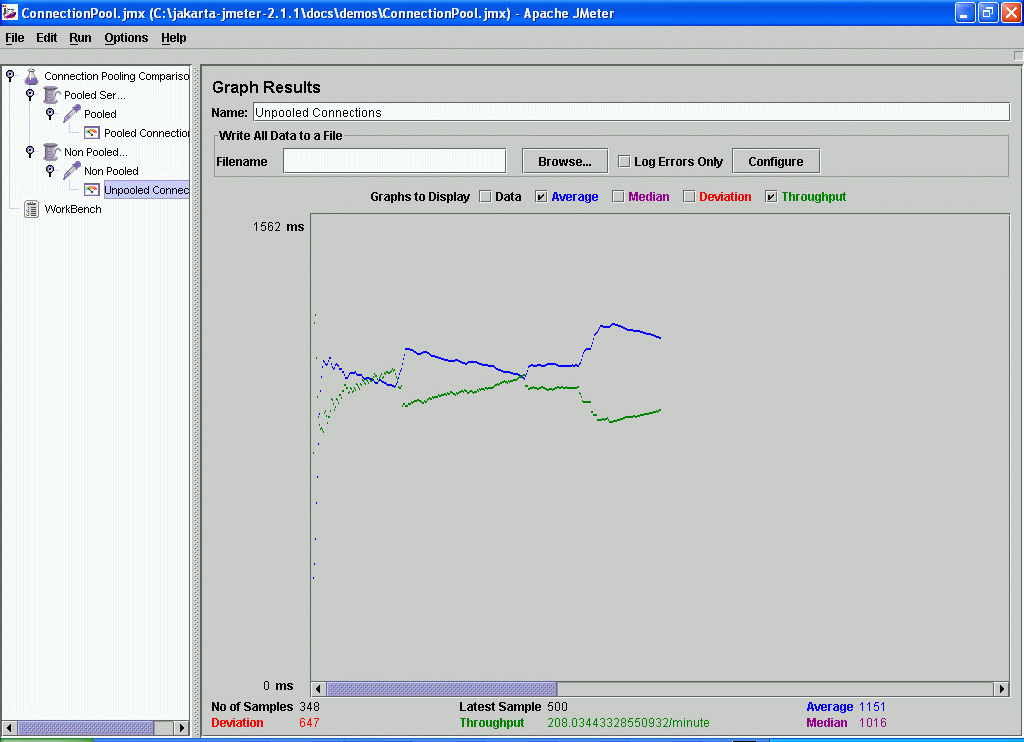
A JMeter test plan was created to continuously run the servlet in pooled and non pooled connection modes within thread groups of 4 threads each. A JMeter results graph is attached to each thread group to measure throughput.
As this example shows connection pooling can make a significant difference to your application's performance. In this example the throughput of 1198 requests per minute using pooled connections is almost six times faster than using non pooled connections. (In practice, the gains in your own application may not be this dramatic since our example does very little JDBC work per connection.)

Figure 1. Pooled connections throughput and times. Enlarge
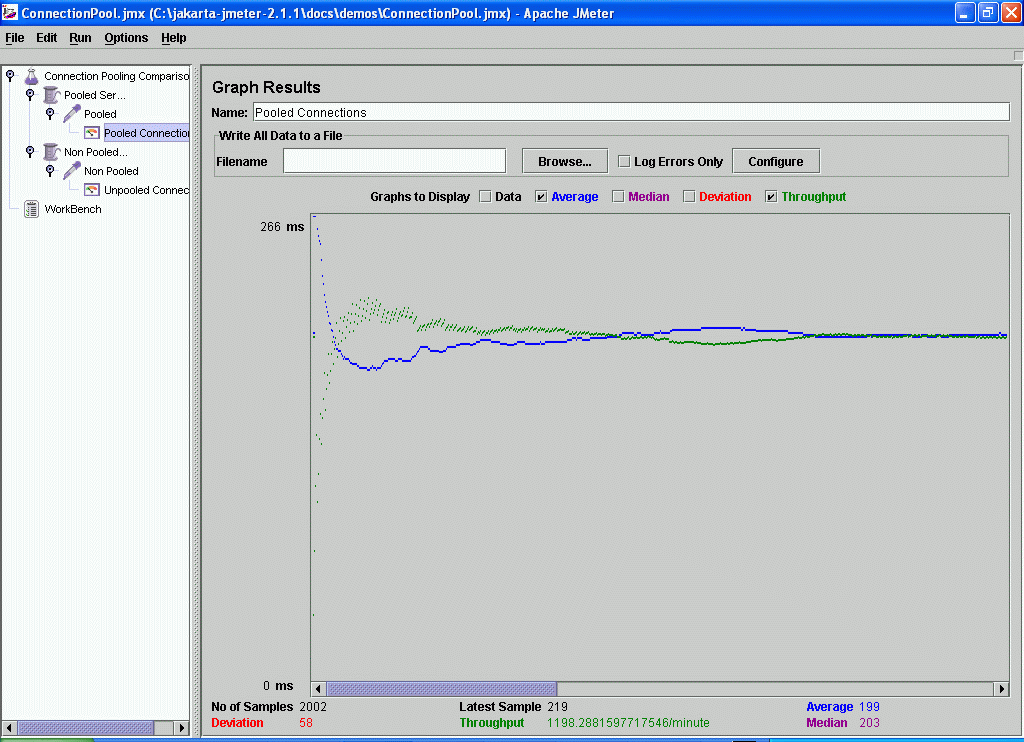

Figure 2. Non pooled connections throughput and times. Enlarge
Here is the DBCP connection pool configuration.
Summary
If your project uses many short lived JDBC connections and does not use connection pooling now then I recommend that you seriously consider using pooling to improve your application's performance and scalability. Additionally, if your application adheres to the simple best practices presented in this article you will maximize the benefits of using connection pooling and make it truly transparent to your application.
Pagination using JDBC and JSP
What is pagination ?
The first time I heard the word pagination, I thought "What's that?". Then I googled and found out that it's a fancy word for splitting search results into bite size pages that the user can snack into. Pagination depends on some factors. It might even depend on what type of framework you use to deliver your solution. An off the shelf API that paginates on a web browser might not work with a Swing application that wants to paginate results. Let's look at some of the ways to paginate.
Using an off the shelf solution to paginate results
This method has its own pros and cons like the rest. To begin with it's quite easy to find an API that's out there, and to use its functions to paginate your results. Often all you have to do is to provide the API, details about the number of results, how many pages to display etc. The API may even be configurable by the user if it is flexible enough. For example JavaWorld featured an article quite a while back about using such an API. Given below is the code related to the pagination tag (a custom tag)
" range="" results=""/>
Given the start position, range and total number of results we can let the API do its job and paginate the results. This kind of solution requires the least work from the developer. The code is ready made and available. All the developer needs to do is to know how to use the API and things work by themselves. (DisplayTag is another such tag libray; see the reference section below for a link.) Although such APIs may reduce development time they may not be as flexible as we might want them to be. If a client requires changes to the way pagination occurs in the application we may have to dive down to the guts of the API and find a solution if it is not available. Worse still, if you don't have the source code to the library you may be in trouble. The pagination tag is a custom tag that a developer can use to paginate his/her results. Imagine if you need to change the code contents of the custom tag because the client wants a change to the way we paginate. Any open solution must be used with caution. Anything that is free and saves time is welcome as long as it does not complicate the solution at a later stage in its life.
Writing your own pagination logic
There are 2 ways (mostly) through which you can fetch your data. One would be to fetch all the results (hence the term greedy) and display it to a user after caching the results. The other approach is to get a selection of the results each time a user requests the data from the search query.
Fetching results the greedy way
I am a big fan of patterns. A particular pattern called the ValueListHandler is very useful when dealing with paginating greedily. This pattern is reusable across several queries and can help your pagination process. A class diagram of the ValueListHandler pattern is illustrated below.
Class diagram: ValueListHandler

The idea is that a client uses a ValueListHandler, which accesses a DAO to return a ValueList. Each value list can contain a couple of value objects (The DAO and VO patterns are mentioned in the references section if you need to go through them). Every time the user needs results to be displayed it can be handled gracefully by asking the ValueListHandler a sub list from the ValueList. Since the ValueList caches the results there is not need to go the database again to fetch the next set of results when the user clicks "Next". Here is a sequence diagram to explain it better.
Sequence diagram: ValueListHandler

Every time the user needs the next (or previous) result set you can ask the ValueListHandler for the next/previous sub list. If you allow the value list to store a list of Objects you can use this solution to set any type of VO into the ValueList and apply this pattern across several searches. You will of course have to cache the ValueListHandler in memory. You will also have to down cast the list of objects from the ValueList to your VO type everytime you want to display the data in the object.
Fetching results the not so greedy way
There is a little problem with the solution that was described above. What if your search result returns 100,000 matches? Your user may have to wait for a long time and be a very unhappy camper indeed. So it often makes sense to fetch only the number of records the user wants to see. Different database have different methods to limit the query size. Oracle uses ROWNUM, and Sybase uses LIMIT. The queries below give you an example of how you can restrict your result set.
Sybase: (Give me rows 0 to 10 of the result)
SELECT * FROM TABLE WHERE {CONDITION} LIMIT 0, 10 Oracle: (Give me the rows between min_row_to_fetch and max_row_to_fetch )
SELECT * FROM ( SELECT /*+ FIRST_ROWS(n) */ a.*, ROWNUM rnum
FROM ( your_query_goes_here, with order by ) a
WHERE ROWNUM <= :MAX_ROW_TO_FETCH )
WHERE rnum >= :MIN_ROW_TO_FETCH;
Oracle's version of the query limitation is a little different because of the way it treats ROWNUM. In order to make the SQL more database agnostic, you can paginate by requesting data by using a sub set of the primary keys that you are interested in. For example if your data list contains the primary keys {1,34,25,56,333,23,99,101} you can create a sub list {1,34,25,56} and fetch this list. The next sub list would be {333,23,99,101}. Pagination is then possible with the following SQL:
SELECT * FROM TABLE WHERE PRIMARY_KEY IN (MY_SUB_LIST)
Another drawback with the greedy approach is that the data becomes stale once you cache it. If your application changes the data in the result set frequently you may have to consider the accuracy of your results when you choose a solution.
Which technique should I use?
Whichever solution fits your requirements. The solution may not even be one of the 3 listed here. These are 3 common approaches to paginating and usually fit the bill based on the user's response time requirements. My personal favorite is to add a Strategy pattern on top of this. If the number of results is less than 500 (say) I use the greedy technique to display the results. If it is more than 500 I use the non-greedy technique to display the results since the user may have to wait for a long time. Be sure to consider the drawbacks carefully in each case. At the risk of dumbing down the Strategy pattern, an illustration for this scenario is given below. Practically one would switch between various implementations of an interface to achieve this. Check the reference section below for more information on this. I would recommend the Head First Design Pattern book or the Gang Of Four design pattern book.
Strategy based on result set size

Conclusion
Each scenario would solve the problem given a certain boundary. You should choose wisely based on what solution best suits you. In the end it does not matter how we solve the problem as long as the client's requirements are met and the design of the solution is flexible to accommodate future changes.
Subscribe to:
Posts (Atom)